ParcelLabel API
Authentication
The NZ Post Shipping APIs use the OAuth 2.0 protocol for secure authentication and authorisation. OAuth 2.0 requires an access token to be included with all API calls.
There are multiple ways to implement OAuth 2.0 authorisation; for most use cases, we recommend using the Client Credentials Flow. If you would like to use a different method, please contact API Support at api@nzpost.co.nz.
All communication with our servers must use TLS (HTTPS).
Step 1:Get your authorisation token
To obtain an authorisation token, you will need your application’s client_id and client_secret.
These can be found on the Developer Portal – My Applications page: Anypoint Platform for APIs
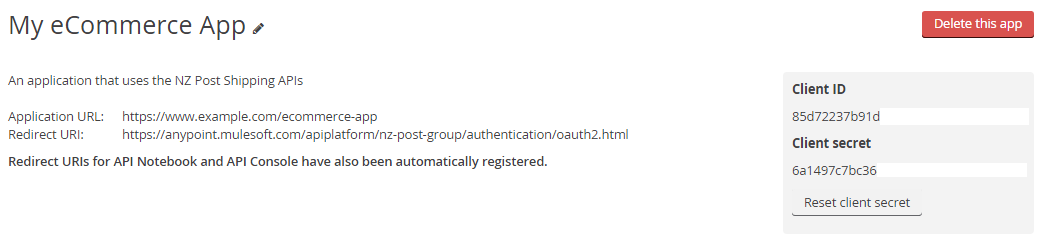
Make a request to the authentication server using your credentials:
$ curl -d "grant_type=client_credentials\
&client_id={YOUR APPLICATION'S CLIENT_ID} \
&client_secret={YOUR APPLICATION'S CLIENT_SECRET}" \
https://oauth.nzpost.co.nz/as/token.oauth2
You will receive a response similar to this:
{
    "access_token": "{ACCESS TOKEN}",
    "token_type": "Bearer",
    "expires_in": 86399
}
Response Parameters
The following fields are returned in the token response:
| Parameter | Description |
|---|---|
| access_token | OAuth 2.0 access token that you will use for subsequent API calls |
| token_type | This is the type of token generated. The default is Bearer token, which can be understood as "give access to whoever brings the bearer token." |
| expires_in | Duration that the access token is valid for, in seconds. The default value is 86399 seconds (24 hours). It is the API consumer responsibility to manage token expiry |
Step 2: Use your authorisation token in an API call
Pass the access_token returned in the response in the Authorization header with the type Bearer to make requests on behalf of a user:
curl -H 'Authorization: Bearer YOUR_ACCESS_TOKEN' \
'https://api.nzpost.co.nz/{API CALL}'
Header Example
